- What are pressure graphs in football and how to read them
- Momentum metric in football: what it is and how the graph is constructed
- Shot-quality and xG in football: how to interpret the quality of shots from the graph
- How to assess a team’s advantage during the match using pressure and momentum graphs
- What data on pressure, momentum, and shot-quality can be obtained through the sports statistics API
- How to use the sports events API for visualizing and analyzing pressure, momentum, and shot-quality graphs
What are pressure graphs in football and how to read them
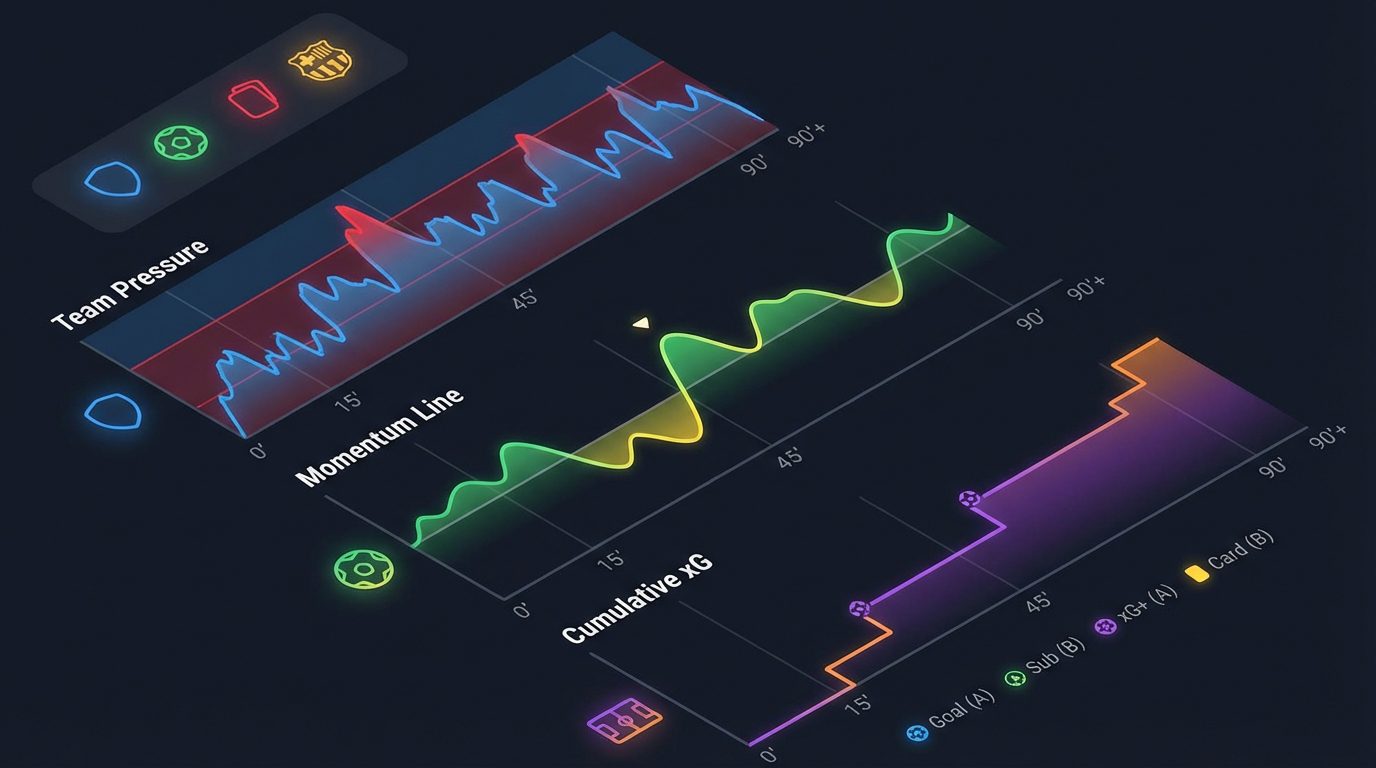
The pressure graph in football shows which team controlled the course of the match at each specific time interval. Unlike the final score, which only records the outcome, the pressure curve allows you to see the hidden dynamics: when one of the teams «squeezed» the opponent, how long the periods of dominance lasted, and at what minutes turning points occurred. On such a graph, the X-axis represents game time, while the Y-axis represents the pressure index calculated from the sum of attacking actions.
In practice, the pressure index is constructed based on several indicators averaged over a sliding window (for example, every 5 minutes of the match). The input data includes the intensity of attacks and play in the final third of the field. With the Sport Events API from api-sport.pro you can obtain detailed statistics for each match through the endpoint /v2/football/matches/{matchId}, including groups Shots, Attack, Passes и Match overview. Inside them are metrics that are well-suited for building a pressure graph:
totalShotsOnGoal,shotsOnGoal— total number of shots and shots on target;угловые удары— corner kicks, often reflecting territorial advantage;finalThirdEntriesиtouchesInOppBox— entries into the final third and touches in the penalty area;ballPossession— ball possession, especially in the context of halves.
The simplest way to interpret the graph: if the pressure line is noticeably shifted upwards — the initiative belongs to the hosts, if downwards — to the guests. Sharp spikes are usually associated with series of shots, corners, or dangerous attacks. Having received match statistics via the API, you can aggregate metrics over time segments and build your own pressure index. Below is an example of how to obtain match data and prepare it for calculating the pressure index on your server or frontend:
const matchId = 14570728;
fetch(`https://api.api-sport.ru/v2/football/matches/${matchId}`, {
  headers: {
    'Authorization': 'YOUR_API_KEY'
  }
})
  .then(response => response.json())
  .then(match => {
    // match.matchStatistics — массив статистики по периодам (ALL, 1ST, 2ND)
    const allPeriod = match.matchStatistics.find(p => p.period === 'ALL');
    // Ищем нужные группы статистики
    const overview = allPeriod.groups.find(g => g.groupName === 'Match overview');
    const shots = allPeriod.groups.find(g => g.groupName === 'Shots');
    const attack = allPeriod.groups.find(g => g.groupName === 'Attack');
    // Пример простого индекса давления по матчу целиком
    function pressureIndex(group) {
      const corners = overview.statisticsItems.find(i => i.key === 'cornerKicks');
      const totalShots = shots.statisticsItems.find(i => i.key === 'totalShotsOnGoal');
      const touchesBox = attack.statisticsItems.find(i => i.key === 'touchesInOppBox');
      return {
        home: corners.homeValue + totalShots.homeValue + (touchesBox?.homeValue || 0),
        away: corners.awayValue + totalShots.awayValue + (touchesBox?.awayValue || 0)
      };
    }
    const pressure = pressureIndex({ overview, shots, attack });
    console.log('Индекс давления по матчу:', pressure);
  });
Momentum metric in football: what it is and how the graph is constructed
Momentum (game «acceleration» or impulse) is a dynamic metric that shows which team currently holds the initiative and how stable this advantage is. Unlike the pressure graph, which often reflects an averaged picture over segments, momentum is usually built as a cumulative line that responds to each significant event: a shot, a goal, a created big goal opportunity. If the line is rising — the advantage is on the side of the hosts, if it is falling — the pressure from the guests is increasing.
The typical logic for building a momentum graph is as follows: with each important attacking event of the team, its «impulse» increases by a certain number of points, while the opponent’s value, on the contrary, relatively decreases. In the Sport Events API, you can use the endpoint /v2/football/matches/{matchId} to obtain extended statistics (for example, bigChanceCreated, shotsOnGoal), as well as /v2/football/matches/{matchId}/events — for the chronology of key events (goals, penalties, cards, stoppages in play). Based on the timestamp of the event and its type, you build the momentum curve, calculating the accumulated advantage of the teams throughout the match.
Below is a simplified example of how to calculate momentum from match events and basic statistics using the Sport Events API. In this example, we consider goals and big moments, as well as shots on target, assigning them different «weights»:
const matchId = 14570728;
const API_URL = 'https://api.api-sport.ru/v2/football';
async function loadMatchData() {
  const [matchRes, eventsRes] = await Promise.all([
    fetch(`${API_URL}/matches/${matchId}`, {
      headers: { 'Authorization': 'YOUR_API_KEY' }
    }),
    fetch(`${API_URL}/matches/${matchId}/events`, {
      headers: { 'Authorization': 'YOUR_API_KEY' }
    })
  ]);
  const match = await matchRes.json();
  const eventsWrapper = await eventsRes.json();
  const events = eventsWrapper.events || [];
  // Базовые веса для событий
  const WEIGHTS = {
    goal: 5,
    bigChance: 3,
    shotOnTarget: 1
  };
  // Заготовка массива значений momentum по минутам
  const totalMinutes = match.currentMatchMinute || 90;
  const momentumSeries = Array.from({ length: totalMinutes + 1 }, (_, m) => ({
    minute: m,
    value: 0
  }));
  // Добавляем влияние голов (из liveEvents)
  events
    .filter(e => e.type === 'goal')
    .forEach(e => {
      const sign = e.team === 'home' ? 1 : -1;
      for (let m = e.time; m <= totalMinutes; m++) {
        momentumSeries[m].value += sign * WEIGHTS.goal;
      }
    });
  // Добавляем влияние больших шансов и ударов из агрегированной статистики (по таймам)
  const allPeriod = match.matchStatistics.find(p => p.period === 'ALL');
  const overview = allPeriod.groups.find(g => g.groupName === 'Match overview');
  const shots = allPeriod.groups.find(g => g.groupName === 'Shots');
  const bigChances = overview.statisticsItems.find(i => i.key === 'bigChanceCreated');
  const shotsOnTarget = shots.statisticsItems.find(i => i.key === 'shotsOnGoal');
  // В реальном проекте эти показатели нужно распределять по временной оси; здесь — пример логики
  const homeImpulse = (bigChances.homeValue * WEIGHTS.bigChance) + (shotsOnTarget.homeValue * WEIGHTS.shotOnTarget);
  const awayImpulse = (bigChances.awayValue * WEIGHTS.bigChance) + (shotsOnTarget.awayValue * WEIGHTS.shotOnTarget);
  const delta = homeImpulse - awayImpulse;
  for (let m = 0; m <= totalMinutes; m++) {
    momentumSeries[m].value += (delta / totalMinutes) * m; // плавное распределение импульса по матчу
  }
  return momentumSeries;
}
loadMatchData().then(series => {
  // series можно отдать в любой графический компонент (Chart.js, Highcharts и т.п.)
  console.log('Momentum series:', series);
});
Shot-quality and xG in football: how to interpret the quality of shots from the graph
Shot-quality and expected goals (xG) describe not just the number of shots, but their actual danger. Even if teams made 10 shots each, the quality of those moments can differ radically: a series of long-range low-danger shots and several shots from inside the penalty area are attacks of different value. That is why analysts use shot-quality and xG graphs to reflect the volume of truly dangerous moments created by each team during the match and at what time intervals.
In the Sport Events API, aggregated statistics on shots are available in the block matchStatistics (groups Shots и Attack) for each match. You can operate with metrics such as totalShotsOnGoal, shotsOnGoal, totalShotsInsideBox, totalShotsOutsideBox, bigChanceCreated, bigChanceScored. Based on them, you can build your own shot-quality index, and then a graph of accumulated shot quality throughout the match. If you have your own xG model, you can substitute its estimates instead of simple weight coefficients, using the API data as a basis for calculations.
Below is an example of how to calculate a basic shot-quality index for a match on your service side. We do not calculate «true» xG, but construct a transparent indicator where shots inside the penalty area, big moments, and shots on target have a greater weight than shots from outside the penalty area:
async function loadShotQuality(matchId) {
  const res = await fetch(`https://api.api-sport.ru/v2/football/matches/${matchId}`, {
    headers: { 'Authorization': 'YOUR_API_KEY' }
  });
  const match = await res.json();
  const allPeriod = match.matchStatistics.find(p => p.period === 'ALL');
  const shotsGroup = allPeriod.groups.find(g => g.groupName === 'Shots');
  const attackGroup = allPeriod.groups.find(g => g.groupName === 'Attack');
  const totalShotsInsideBox = shotsGroup.statisticsItems.find(i => i.key === 'totalShotsInsideBox');
  const totalShotsOutsideBox = shotsGroup.statisticsItems.find(i => i.key === 'totalShotsOutsideBox');
  const shotsOnTarget = shotsGroup.statisticsItems.find(i => i.key === 'shotsOnGoal');
  const bigChances = attackGroup.statisticsItems.find(i => i.key === 'bigChanceCreated');
  // Простая весовая модель shot-quality
  function sideQuality(side) {
    const inBox = totalShotsInsideBox[`${side}Value`];
    const outBox = totalShotsOutsideBox[`${side}Value`];
    const onTarget = shotsOnTarget[`${side}Value`];
    const big = bigChances[`${side}Value`];
    return inBox * 1.2 + outBox * 0.5 + onTarget * 0.8 + big * 2.0;
  }
  return {
    home: sideQuality('home'),
    away: sideQuality('away')
  };
}
loadShotQuality(14570728).then(q => {
  console.log('Индекс shot-quality по матчу:', q);
  // Далее можно строить накопительный график shot-quality / xG в привязке к времени
});
How to assess a team’s advantage during the match using pressure and momentum graphs
Joint analysis of pressure and momentum graphs allows for a much more accurate assessment of the actual advantage of a team than simple statistics of shots or ball possession. If the pressure curve remains above the zero line for a long time, and the momentum graph is steadily rising, one can speak of stable dominance. Conversely, when pressure is high, but momentum «zigzags» up and down, it often indicates mutual attacks and a «seesaw» scenario, where the game can easily swing in either direction.
It is especially useful to compare these graphs with the chronology of key events and the dynamics of bookmaker odds. In the Sport Events API, you can simultaneously receive: live events through the endpoint /v2/football/matches/{matchId}/events, full match statistics through /v2/football/matches/{matchId} and the bookmakers’ line in the array oddsBase. This approach allows you to see how the market reacts to growing pressure and changing momentum: often the odds change even before a goal is scored, when the model notices prolonged dominance by one side.
Below is an example of how to combine your calculations of pressure and momentum charts with odds from the Sport Events API. It is assumed that the functions buildPressureSeries и buildMomentumSeries are already implemented based on statistics and events, and here we focus on the 1X2 market (group 1X2):
async function loadMatchWithOdds(matchId) {
  const res = await fetch(`https://api.api-sport.ru/v2/football/matches/${matchId}`, {
    headers: { 'Authorization': 'YOUR_API_KEY' }
  });
  const match = await res.json();
  // Ваши функции построения серий давления и momentum
  const pressureSeries = buildPressureSeries(match);   // [{ minute, home, away }]
  const momentumSeries = buildMomentumSeries(match);   // [{ minute, value }]
  const markets = match.oddsBase || [];
  const fullTimeMarket = markets.find(m => m.group === '1X2' && m.period === 'Full-time');
  const odds = fullTimeMarket ? fullTimeMarket.choices.map(c => ({
    name: c.name,
    decimal: c.decimal,
    initialDecimal: c.initialDecimal,
    change: c.change
  })) : [];
  return {
    pressureSeries,
    momentumSeries,
    odds
  };
}
loadMatchWithOdds(14570728).then(data => {
  // На фронтенде вы можете отрисовать:
  // 1) линию давления по минутам для обеих команд;
  // 2) линию momentum;
  // 3) текущие коэффициенты 1X2 в подписи или на отдельном графике.
  console.log('Аналитический пакет для матча:', data);
});
What data on pressure, momentum, and shot-quality can be obtained through the sports statistics API
Ready pressure, momentum, or xG charts are usually derivative metrics that are built on the product or analytical platform side. The task of the Sport Events API is api-sport.pro to provide you with the most detailed and structured raw data from which you can reliably calculate your own models. For football through the endpoint /v2/football/matches и /v2/football/matches/{matchId} you receive an array matchStatistics, broken down by periods (ALL, 1ST, 2ND) and grouped by logical blocks: shots, attack, passes, duels, defense, and goalkeeper line.
Within these groups, dozens of metrics relevant specifically for building pressure, momentum, and shot-quality graphs are available: number of shots, shots on target, shots inside and outside the penalty area, big chances, touches in the penalty area, ball possession, and much more. Additionally, through the endpoint /v2/football/matches/{matchId}/events you receive a detailed timeline of key events — goals, substitutions, cards, added time. Based on this data, you can:
- build a pressure index based on the combination of attacking actions and ball possession;
- calculate momentum as a cumulative advantage based on significant events and dangerous attacks;
- create your own shot-quality indices and integrate external xG models;
- compare the dynamics of metrics with market odds from
oddsBasefor live analytics and betting.
Access to the data is provided via an API key, which can be obtained at the personal account.. In upcoming updates, support for WebSocket subscriptions for events and advanced AI tools will be added to the infrastructure, allowing data to be transmitted for your graphs almost in real-time and building more advanced predictive models on top of the statistics provided by the Sport Events API.
How to use the sports events API for visualizing and analyzing pressure, momentum, and shot-quality graphs
To turn raw sports statistics data into user-friendly graphs of pressure, momentum, and shot quality, a clear technical pipeline is needed. At the first step, you receive data from the Sport Events API: a list of matches for the required tournaments through /v2/football/matches, then the details of a specific match with the block matchStatistics, events, and bookmaker odds. Next, the data is cleaned and normalized in your storage (DB or in-memory cache), after which derived metrics are calculated based on them — pressure indices, momentum, and shot quality indicators.
On the frontend, the obtained series of values are tied to a timeline and visualized using any popular charting library. You can draw separate charts or combine them into one dashboard: for example, at the top — a cumulative chart of xG and shot quality, below — a momentum line, at the bottom — the dynamics of 1X2 and totals odds. Thanks to the fact that the Sport Events API supports several sports (football, hockey, basketball, tennis, table tennis, esports, etc.), the same architecture can be extended for other disciplines, just by adapting the calculation rules for metrics to the specifics of the sport.
Below is an example of a server script in Python that retrieves matches for today, selects the required match, and prepares data for subsequent calculations and visualizations. In a real project, this code can be placed in a background worker or data aggregation service, and later replace periodic requests with WebSocket subscriptions when this functionality becomes available in the infrastructure. api-sport.pro:
import requests
API_KEY = 'YOUR_API_KEY'
BASE_URL = 'https://api.api-sport.ru/v2/football'

def get_today_matches():
    resp = requests.get(f"{BASE_URL}/matches", headers={
        'Authorization': API_KEY
    })
    resp.raise_for_status()
    return resp.json()['matches']

def get_match_details(match_id: int):
    resp = requests.get(f"{BASE_URL}/matches/{match_id}", headers={
        'Authorization': API_KEY
    })
    resp.raise_for_status()
    return resp.json()

if __name__ == "__main__":
    matches = get_today_matches()
    if not matches:
        print("На сегодня матчей нет")
    else:
        match_id = matches[0]['id']
        match = get_match_details(match_id)
        # Здесь вы вызываете свои функции:
        # build_pressure_series(match), build_momentum_series(match),
        # calculate_shot_quality(match) и т.п.
        print(f"Загружен матч {match_id} для дальнейшей аналитики")